
ST EDGE · Professional Performance Analytics
Back to home
THE SUITE

One document for every question

Institutional-style documents, ready for whoever has to evaluate the trading, whether that's a partner, an allocator or a prop firm. Every part of them can be configured: sections, headers, which data to show or redact, watermark and legal page. Each page states which data it was built from, and a preview is shown before saving.
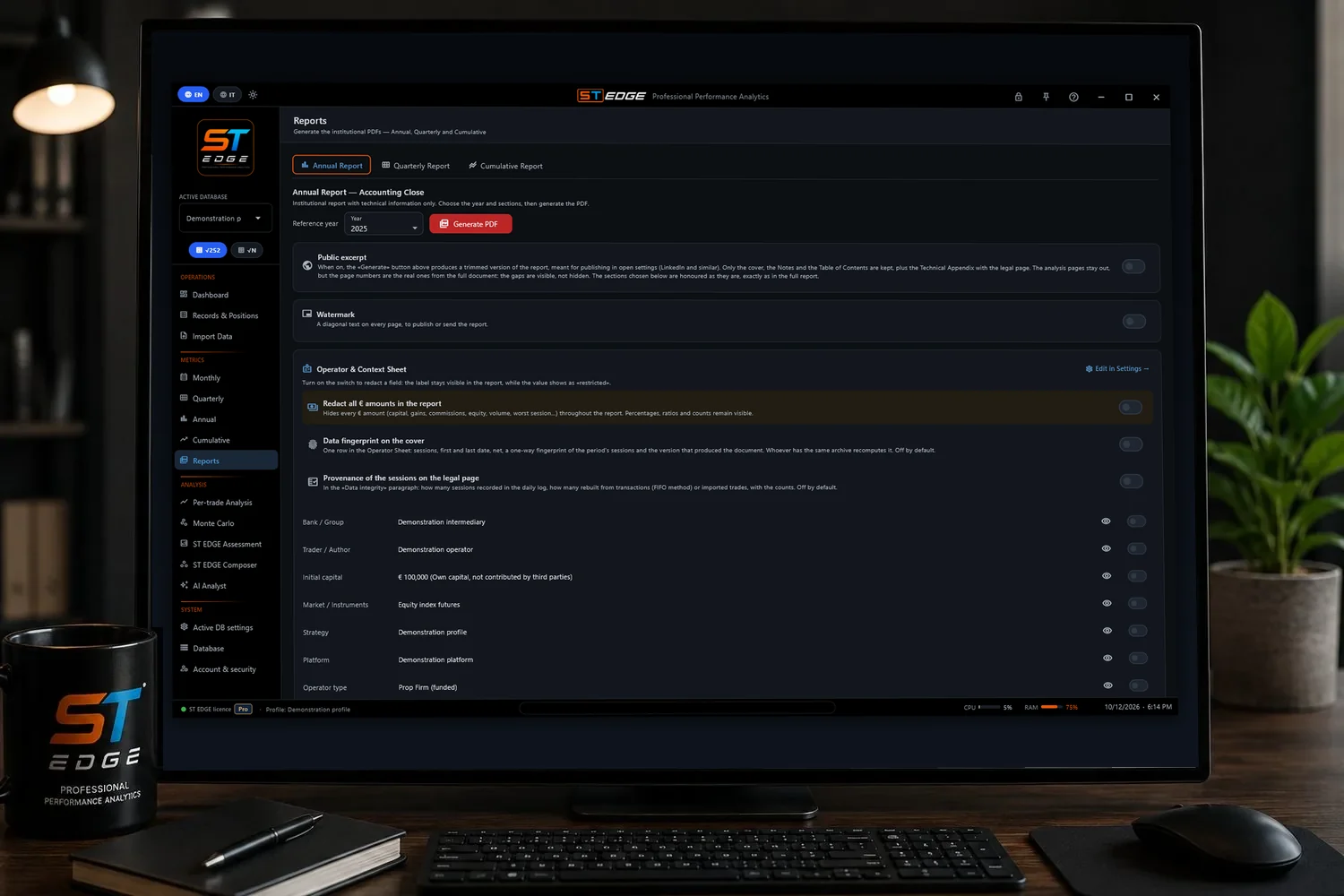
ST EDGE Reports: report sections, redaction of amounts and PDF preview
Period and sections are chosen, and the amounts can be redacted or the identity fields hidden: percentages, ratios and counts stay, so the document stays comparable.
HOW A REPORT IS BORN

Everything starts from the days

At the top is what gets loaded: days, trades, transactions. In the middle is the base the 15 metrics are computed on, and below are the ways of reading it: the Assessment judges, the AI Analyst comments, Monte Carlo explores and the reports present. The engine reads only the days. Trades and transactions are used to build them but don't enter the score, so the score means the same thing for everyone.
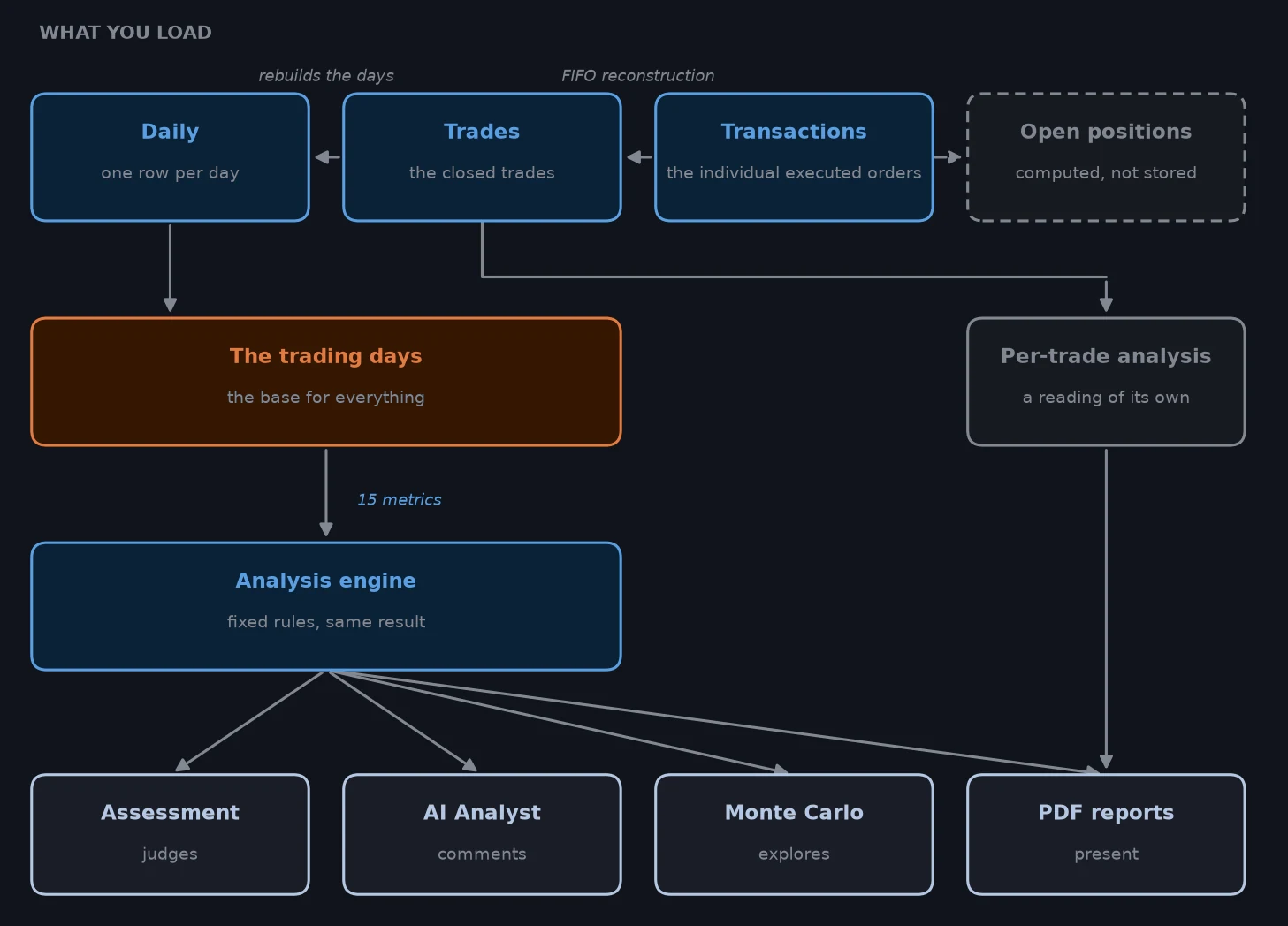
How a report is made: from the loaded data to the Assessment, the Monte Carlo and the PDFs
The arrows say where everything comes from: if a number looks wrong, the box before it is the place to check.
THE MAP OF THE DOCUMENTS

Ten documents, and what each one is for

Each one answers a different question, so the choice depends on who receives it. Further down, eight of them can be browsed, generated from the sample profiles.

Annual Report
Reports › Annual
A full year, with the chosen sections: accounting summary, months, metrics, equity and drawdown, distribution, Monte Carlo, Per-trade Analysis, appendix. To keep, compare or hand over.
Quarterly Report
Reports › Quarterly
One quarter on its own, with the year's numbers next to it. For whoever wants that quarter's full analysis; for an update, the Annual on the current year is enough.
Cumulative Report
Reports › Cumulative
Several years read as one block, with percentages based on the first year's capital. It's the document for presenting a multi-year track record.
Public excerpt
Switch in the three reports
The same report cut down to the first pages, Notes and Appendix, with the real page numbers and the "EXCERPT" band on the cover. It's meant for a first contact. It is shorter, but not anonymous.
Assessment PDF
ST EDGE Assessment
Score 0–100 with its precision band, metrics with their bands, percentile, diagnostics, verdict and an appendix on the calculations. It carries the reproducibility seal. For readers who want a verdict as well as the numbers.
Monte Carlo PDF
Monte Carlo
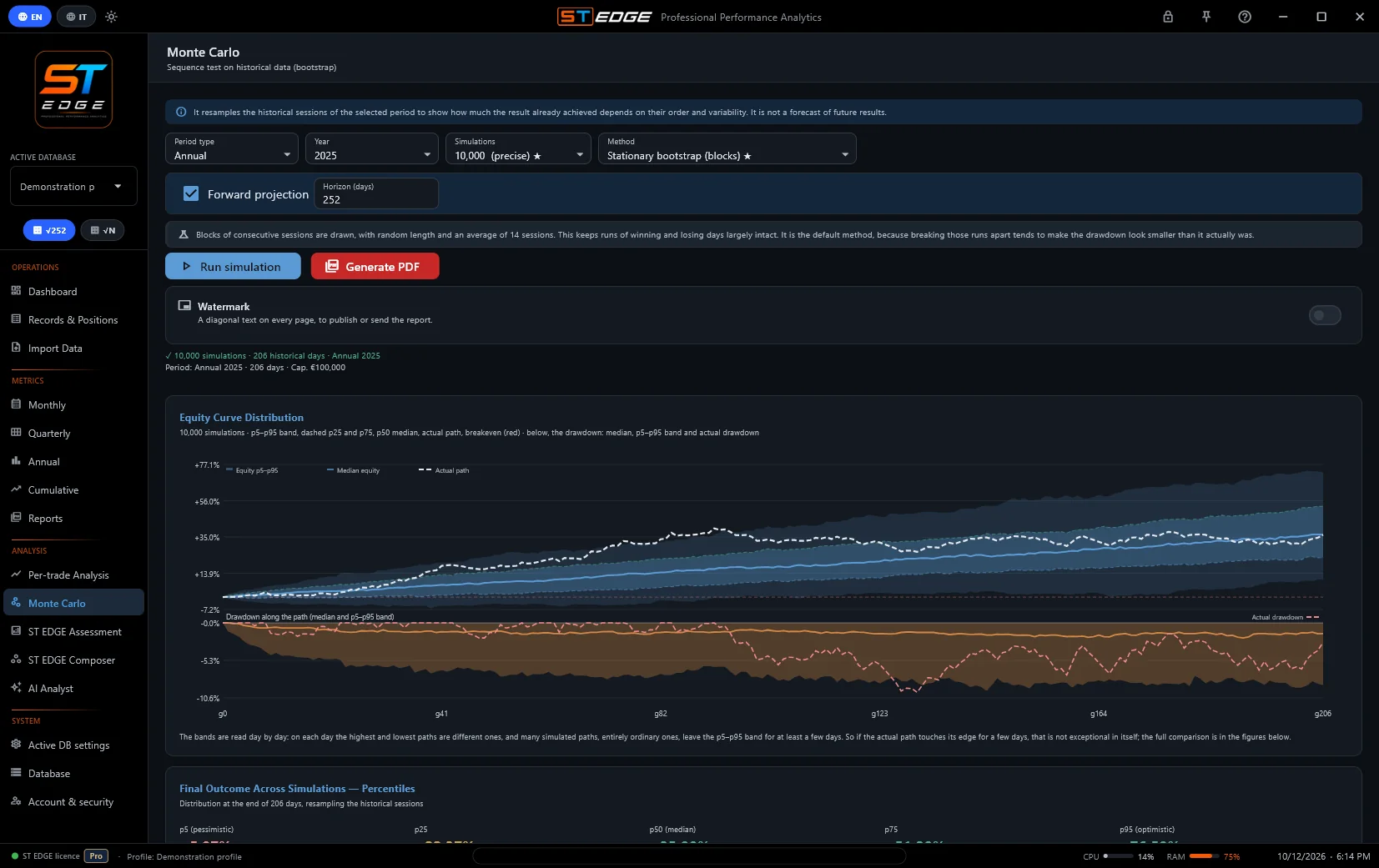
From 1,000 to 20,000 resampled paths with three methods, the simulated drawdowns next to the one actually experienced, and a verdict on the quality of the history. Before generating it, the user chooses what to hide (amounts and the cover sheet fields), the watermark and the parts to include, legal page included. For whoever asks how much the order of the days weighs.
AI Report
AI Analyst
The language model's commentary on numbers ST EDGE has already calculated. The cover says it isn't reproducible: it's for the person who generates it, to prepare for questions, and not meant to be handed over.
Per-trade Analysis
Analysis › Per-trade Analysis
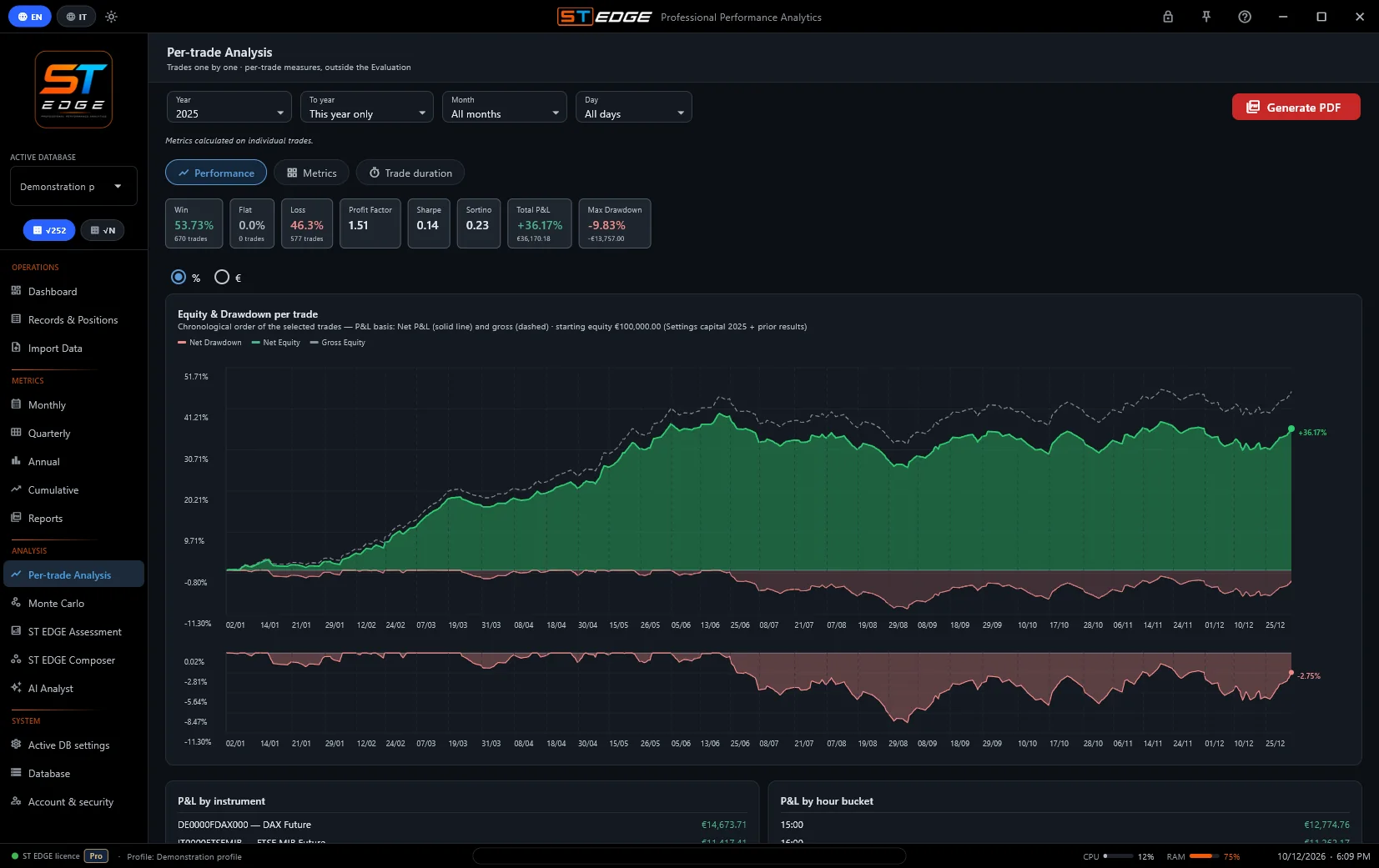
Measures per trade, per instrument, per time slot and by duration, with redaction of amounts, instruments and identifying data. Requires imported trades.
Composer PDF
ST EDGE Composer
Puts the proposals on screen in writing: how the search was run, profiles, score, year by year, check, alternatives, frontier and method. It can be saved on the Pro and EDU plans.
Overviews and Equity
Monthly · Quarterly · Annual
The statistics tables with their charts, and the year's equity and distribution PDF. Working notes, for internal use.

Samples to browse

Eight documents generated by ST EDGE from the sample profiles, so with test data and a sample watermark. They can be browsed here, page by page, in the language chosen for the site.
INSIDE THE DOCUMENTS

What's on screen goes into the PDF

Monte Carlo: fan of paths and simulated drawdowns
Monte Carlo: the fan of paths, with the real path and the real drawdown for comparison.
Per-trade Analysis: curve by trade
Per-trade Analysis: equity and drawdown trade by trade, results by instrument and by time slot.
CONFIGURABLE IN EVERY PART

The document is put together by the user

Every report adapts to whoever receives it: what goes in, how it looks and what stays private can all be chosen.

Sections
Reports · Report sections
Each section is a checkbox: anything switched off stays out of the document, and the Index updates to match. This applies to the Annual, Quarterly and Cumulative reports, to the Per-trade Analysis items and to the Assessment, Composer and Overview PDFs.
The headers
Active DB settings › PDF Report
Name, bank or group, market, platform, strategy, operator type: they're entered once, or filled in from the strategy profile. An empty field stays empty and is never filled with a sample value. The Notes open the report with custom text.
The operator sheet
Operator & Context sheet
For each cover row, the eye removes it from the report, while the switch keeps it but shows «restricted». That way, what the reader sees is decided row by row.
The amounts
Redact all amounts · from the Premium plan
A single switch removes every currency figure, even inside sentences. Percentages, ratios and counts stay, so the document can still be compared.
The excerpt cover
Public excerpt
In the public excerpt, Sharpe, Sortino, Profit Factor and Win rate can also be hidden from the cover.
The watermark
In every PDF
A diagonal text across every page: a ready-made phrase («Confidential», «Reproduction prohibited», «Not for distribution»…) or a custom one, with name, date and recipient underneath. The setting is saved for each document.
The legal page
Settings › PDF Report · Reports
The risk disclosure can be ST EDGE's or custom text, with any optional statements added. On request it also reports where the days come from: recorded, or rebuilt from trades and transactions.
Verifiability
Data fingerprint · Calculation basis
With the fingerprint on, the cover shows days, dates, net, a one-way fingerprint and the version that produced the document, so anyone with the same archive can recompute it. The calculation basis (annual or operating) is always shown.
Language and file name
App language · Save PDF
The document comes out in the app language, Italian or English, including the appendix and disclaimers. A preview comes first, and the file is only written when «Save PDF» is pressed, with a suggested name (document, period, date and time).

What cannot be removed

Every page states whether the data is live or test, and on test data the red band can't be removed, because a sheet passed around on its own has to make clear what it contains. Metrics come with their rating band, and the appendix includes the formulas. What is shown can be chosen, but not how it's calculated.

WHICH DOCUMENT, FOR WHOM

To an allocator: first the public excerpt, then the full Annual or Cumulative with the Assessment PDF on the same period. To a prop firm: the Assessment PDF, with the Annual for continuity. To a bank or a partner: the Annual Report. For personal use: the screen is enough; a PDF is for when someone has to read the numbers without the app in front of them.

WHAT NO DOCUMENT SAYS

Drawdown is measured close to close. Intraday drawdown, the one prop firms measure, is deeper and can't be derived from daily data. The nature of the data is stated by the user, and ST EDGE doesn't verify it. Deposits and withdrawals aren't shown. Finally, the score summarises the metrics with the band of each one; it isn't a rating or a recommendation.

TRYING IT ON REAL DATA

The beta is free until 31 March 2027 with every feature open. Every screen is explained in the manual.